Execution
Vadacode supports the execution of Datalog+/- programs directly from the editor window. TL;DR press Ctrl+Shift+Enter and you’re set.
| This feature requires an external reasoner supporting the Vadalog dialect of Datalog+/-. Reasoner endpoint configuration is described in Settings. |
Execute a Datalog+/- program
Open the Command Palette (⌘+Shift+P on macOS or Ctrl+Shift+P on Windows/Linux) and type in Vadacode: Evaluate program (or use directly the shortcut Ctrl+Shift+Enter).
The program will be sent to the reasoner, which in turn will execute it and return results to Visual Studio Code. Vadacode then shows the results in the Reasoner view:
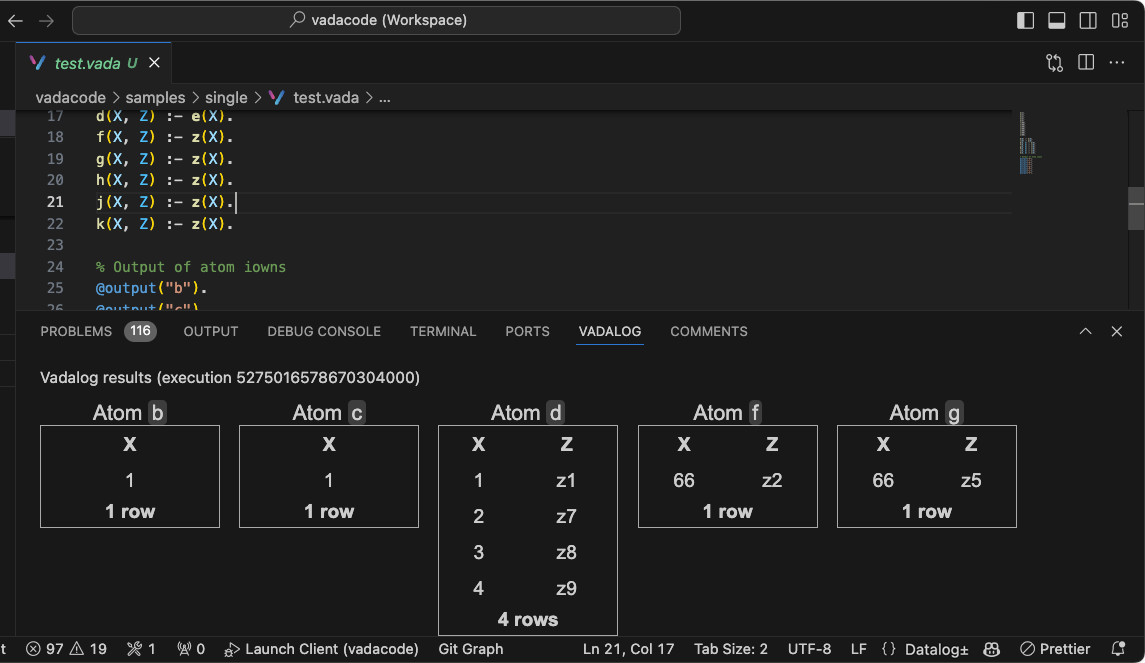
Figure 1. Reasoner view
Vadacode sends requests to the endpoint specified in the Reasoner endpoint setting.
| Vadacode (by design) doesn’t stop you from sending ill-formed programs to the reasoner; if the reasoner returns an execution error, it will be shown in the same Reasoner view. |
When returning results, ensure that results are limited to a reasonable number of tuples. Massive outputs are not filtered in the UI and may break the extension. You can use @post("atomName", "limit(N)"). annotation to ensure that results are properly capped.
|